4. Weapons Alignment (Pistol, Bow, Torch, etc)
Pistol
Section titled “Pistol”Right-Hand Placement
Section titled “Right-Hand Placement”When the pistol overlay is first tested on the custom character, the pistol can appear in the wrong place, such as near the ground:
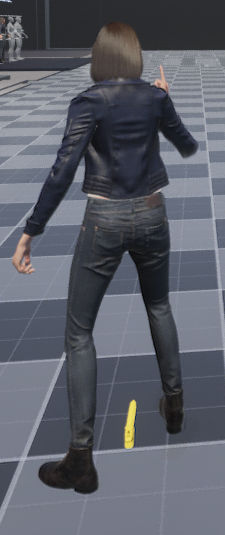
The pistol uses the same general right-hand attachment idea as the rifle. Because the rifle socket was already aligned on hand_r, it is faster to duplicate that socket and rename it instead of starting from an empty socket.
Open the character skeleton:
/Content/Shenya2/Meshes/SK_Shenya_SkeletonThen:
- select the existing
Riflesocket - copy the socket
- select the
hand_rbone - paste the socket
- rename the pasted socket to
Pistol

This works well because the pistol and rifle both attach to the right hand. The copied socket gives the pistol a useful starting transform, so you only need smaller adjustments afterward.
Test the pistol overlay in play mode and tune the Pistol socket until the pistol sits in the right hand.
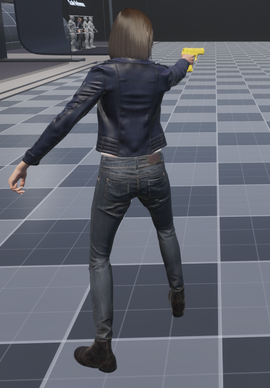
Two-Handed Left-Hand IK
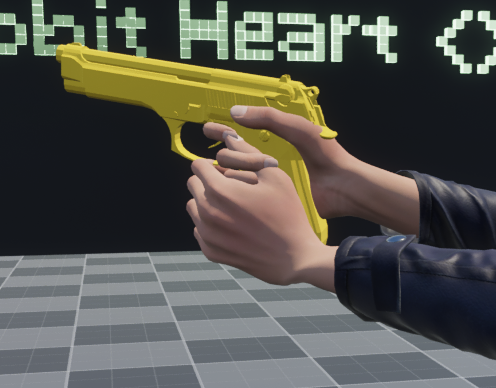
Section titled “Two-Handed Left-Hand IK”The right-hand socket fixes the pistol attachment, but pistol two-handed mode also needs the support hand to move toward the pistol.
Before adding a grip target, the left hand can miss the pistol:
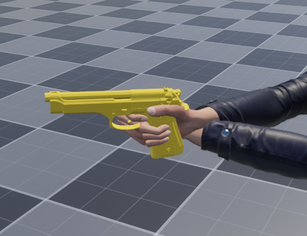
The setup is the same pattern used for the rifle:
- duplicate the pistol overlay assets into project content
- add a
LeftHandGripsocket to the duplicated pistol skeleton - make
RefreshOverlayObjectuse the duplicated pistol mesh - let the Animation Blueprint read
LeftHandGripfromOverlaySkeletalMesh
Step 1: Duplicate the pistol assets
Section titled “Step 1: Duplicate the pistol assets”Copy the pistol skeletal mesh and skeleton from the ALS plugin content into your project content.
The plugin pistol mesh is:
/ALS/ALS/OverlayObjects/Pistol/SKM_Als_PistolPlace the duplicated assets in:
/Content/ALS_Shenya/Overlay_Objects/Pistol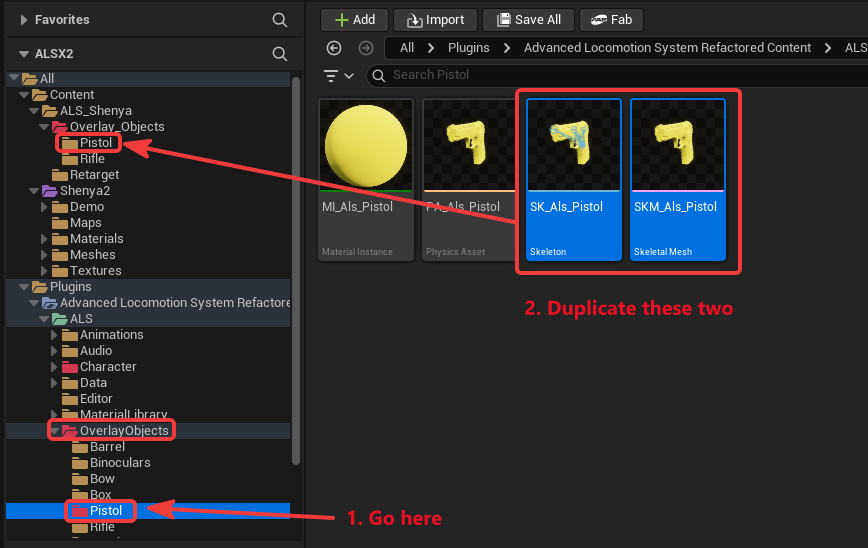
Rename the duplicated assets:
| Asset | Name |
|---|---|
| Pistol skeleton | SK_Als_Pistol_Shenya |
| Pistol skeletal mesh | SKM_Als_Pistol_Shenya |
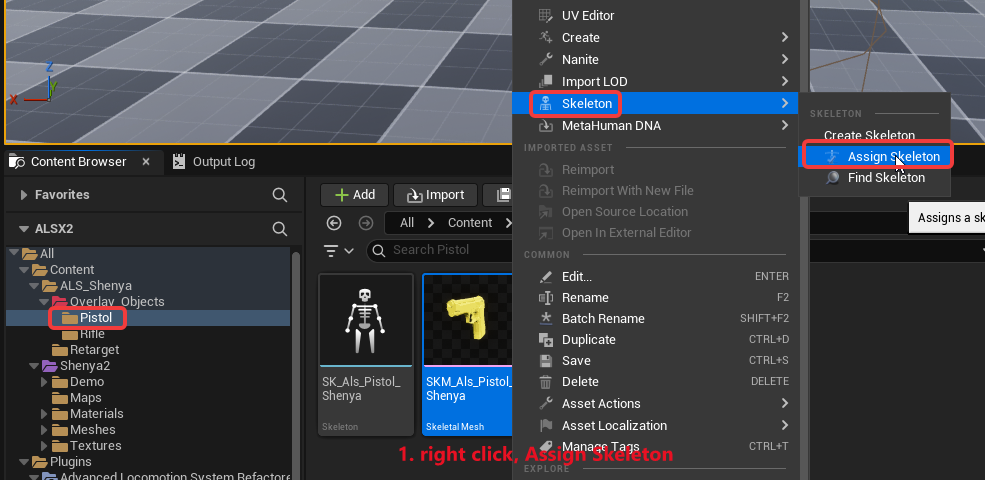
Then assign the duplicated mesh to the duplicated skeleton:
- right-click
SKM_Als_Pistol_Shenya - choose
Skeleton > Assign Skeleton - choose
SK_Als_Pistol_Shenya
Step 2: Add LeftHandGrip to the duplicated pistol
Section titled “Step 2: Add LeftHandGrip to the duplicated pistol”Open:
/Content/ALS_Shenya/Overlay_Objects/Pistol/SK_Als_Pistol_ShenyaCreate a socket named:
LeftHandGripIn this setup, the socket is added under the pistol skeleton root.
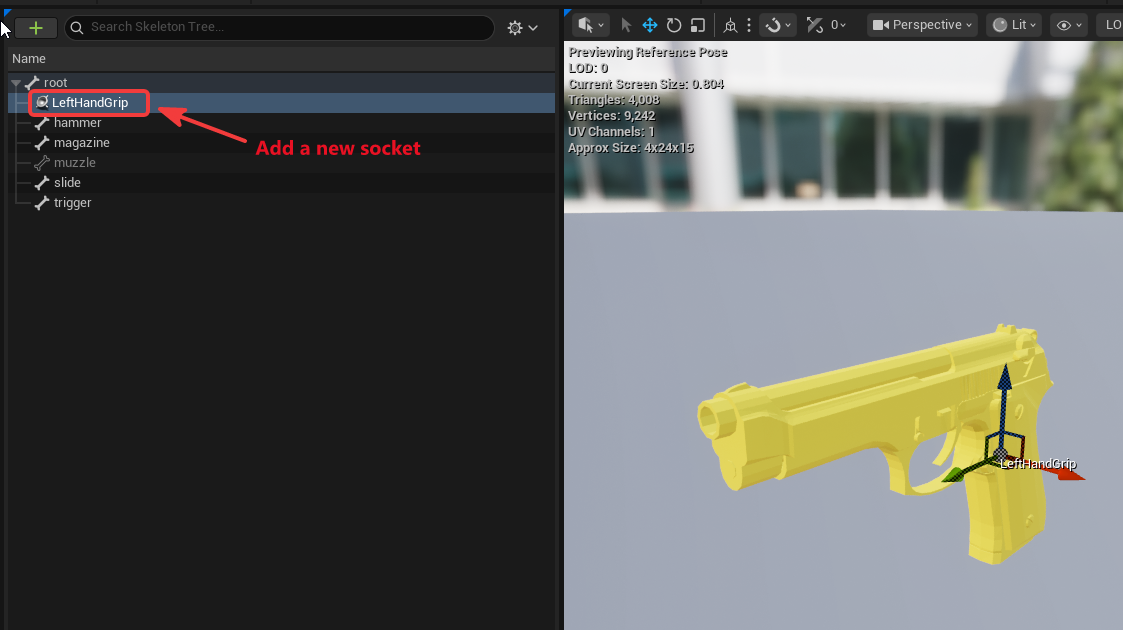
The example LeftHandGrip socket values are:
(X=4.093821,Y=-3.950487,Z=-5.120588)(Pitch=13.986715,Yaw=86.867213,Roll=-173.996744)Treat these values as a reference, not a universal preset. Different pistol meshes and character proportions will need different values.
Step 3: Use the duplicated pistol in the character Blueprint
Section titled “Step 3: Use the duplicated pistol in the character Blueprint”Open:
/Content/ALS_Shenya/B_Als_ShenyaThen open:
RefreshOverlayObjectThe pistol one-handed and pistol two-handed branches both call AttachOverlayObject with:
SocketName: PistolUpdate the pistol overlay attachment so it uses your duplicated pistol mesh:
/Content/ALS_Shenya/Overlay_Objects/Pistol/SKM_Als_Pistol_ShenyaAfter this, the pistol overlay uses the duplicated pistol mesh that contains LeftHandGrip.
Test in pistol two-handed mode and tune the LeftHandGrip socket until the support hand lands correctly.
One-Handed IK Exclusion
Section titled “One-Handed IK Exclusion”Pistol one-handed and pistol two-handed both use the Pistol attachment socket and the same duplicated pistol mesh. That creates one extra problem: the duplicated pistol has a LeftHandGrip socket, but pistol one-handed mode should not pull the left hand toward it.
The Animation Blueprint should only enable the left-hand IK when:
- the overlay skeletal mesh has a
LeftHandGripsocket - the current overlay mode is not
Als.OverlayMode.PistolOneHanded
Open:
/Content/Shenya2/Meshes/ABP_Shenya2In the Event Graph, the condition for enabling IK should combine:
Does Socket Exist(OverlaySkeletalMesh, LeftHandGrip)with:
OverlayMode != Als.OverlayMode.PistolOneHanded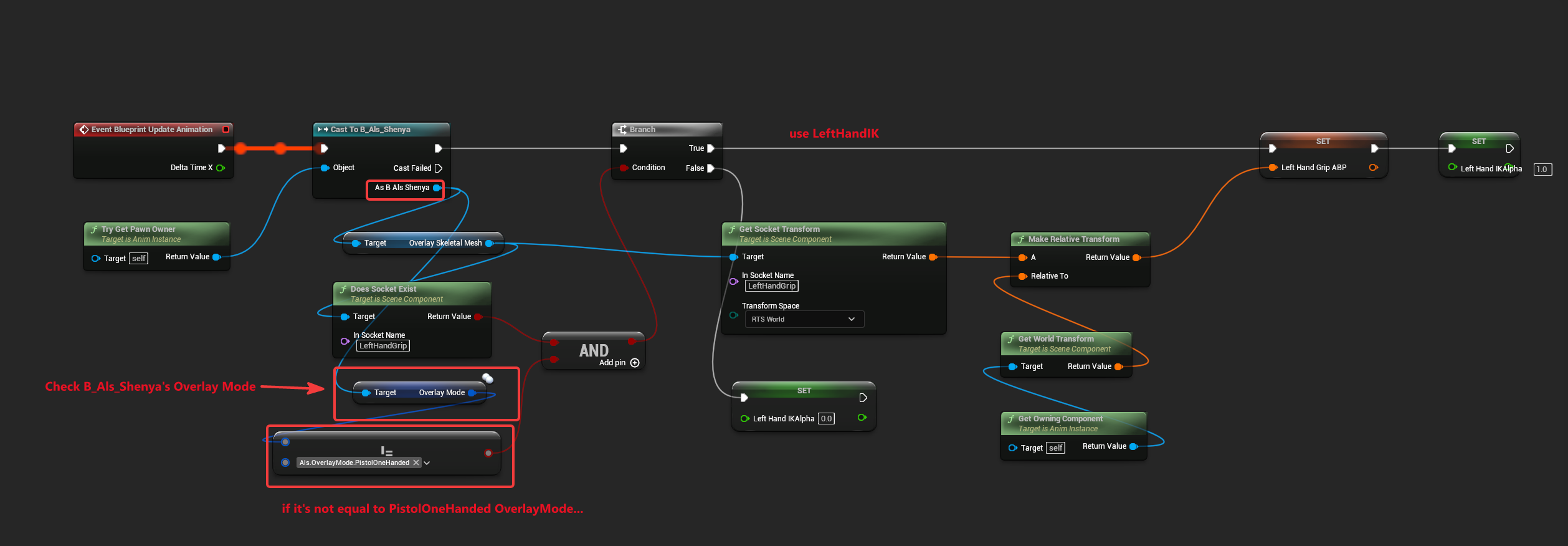
When the combined condition is true, update LeftHandGripABP and set LeftHandIKAlpha to 1.0.
When the combined condition is false, set LeftHandIKAlpha to 0.0.
This keeps pistol two-handed mode corrected while leaving pistol one-handed mode free to use its normal one-handed animation pose.
The bow is different from the rifle and pistol because its attachment side is the left hand.
Create a Bow socket on the character skeleton under:
hand_l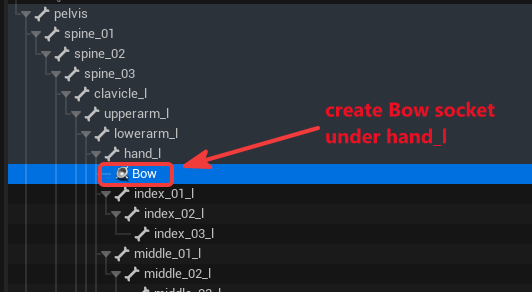
Test in play mode and adjust the socket until the bow sits in the left hand:
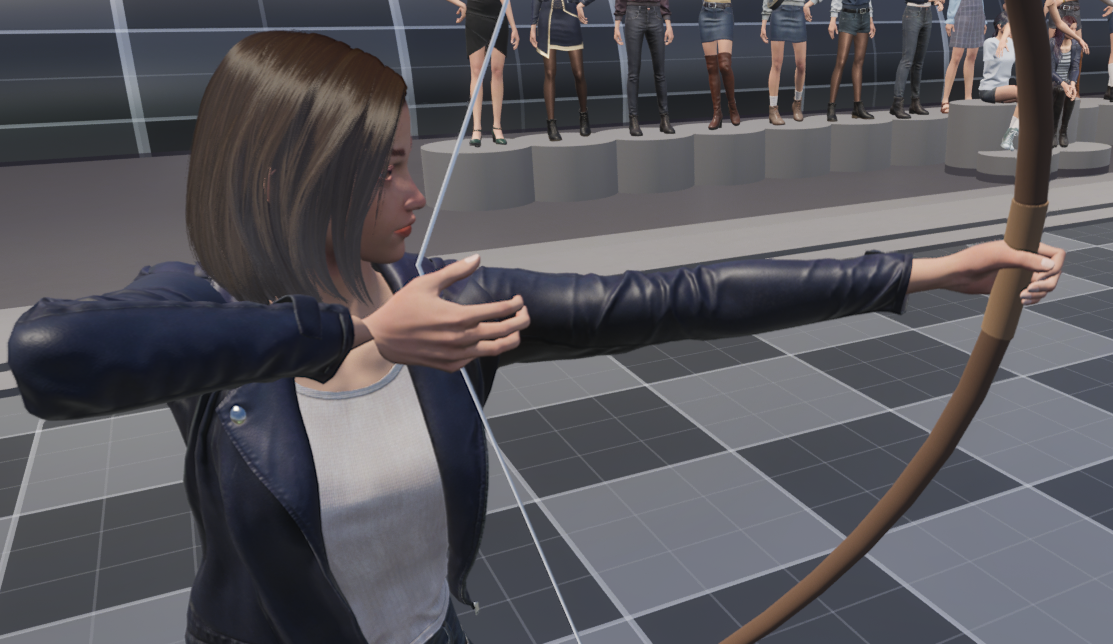
Example Bow socket values from the character skeleton:
(X=6.970111,Y=-1.769488,Z=-0.657231)(Pitch=26.755795,Yaw=97.255917,Roll=-164.225699)Current bow limitations
Section titled “Current bow limitations”The bow alignment shown here only covers the main bow attachment socket.
The following problems are still outside this guide:
- the right hand does not yet align perfectly with the string
- the right wrist can twist
- the right elbow may need a separate pole-vector adjustment
Those issues need a bow-specific hand/string setup. This page does not present a solution for that yet because the setup here only covers the main Bow socket alignment.
The torch overlay uses a static mesh instead of a skeletal mesh.
Create a Torch socket on the character skeleton under:
hand_l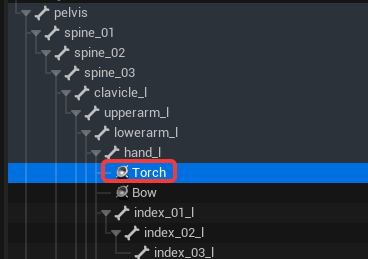
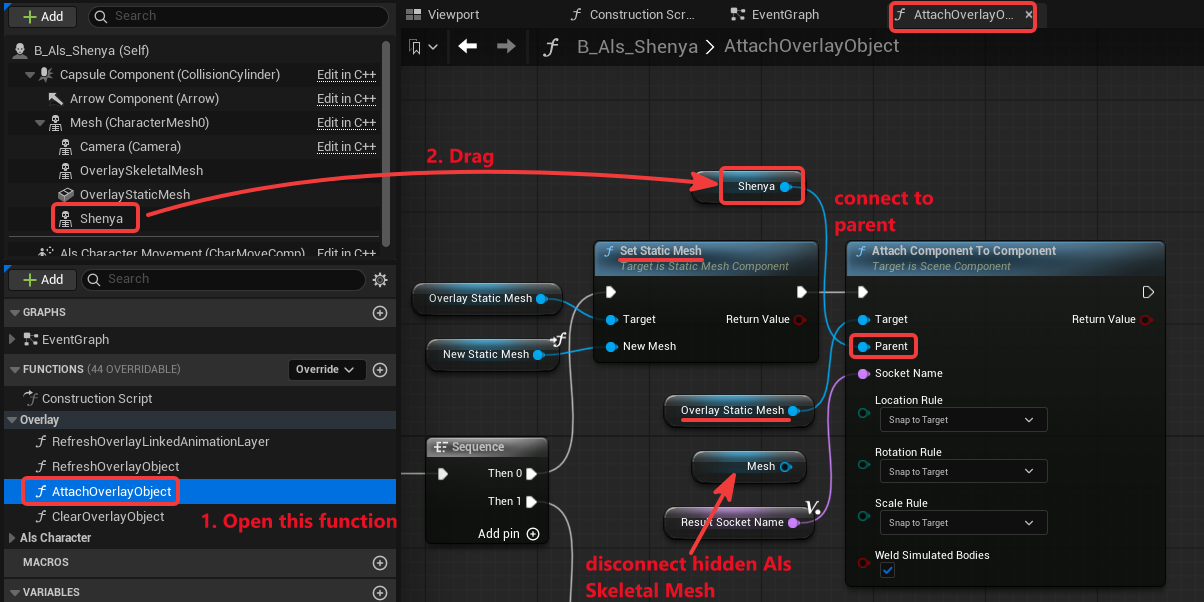
Because the torch uses OverlayStaticMesh, make sure the static mesh attach path in AttachOverlayObject also attaches to the visible character mesh.
Open:
/Content/ALS_Shenya/B_Als_ShenyaThen open:
AttachOverlayObjectFor the static mesh branch:
- find the
Set Static Meshnode that targetsOverlayStaticMesh - find the following
Attach Component To Componentnode - keep
Targetconnected toOverlayStaticMesh - connect
Parentto the visible character mesh component - keep
Socket Nameconnected toResultSocketName - keep location, rotation, and scale rules set to
Snap to Target
Test in play mode and adjust the Torch socket:
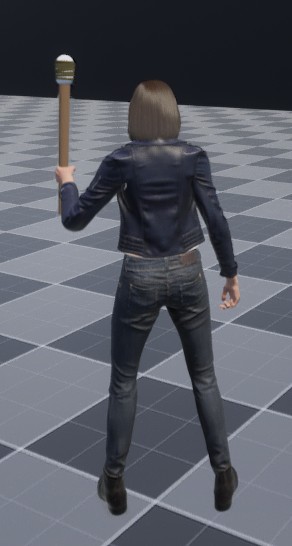
Example Torch socket values from the character skeleton:
(X=6.970111,Y=-1.769488,Z=-0.657231)(Pitch=0.000610,Yaw=127.245728,Roll=-162.519106)Box, Barrel, and Binoculars
Section titled “Box, Barrel, and Binoculars”Box, barrel, and binoculars follow the same socket-alignment idea as the other static overlays.
Create or duplicate sockets on the character skeleton:
- duplicate the
Torchsocket as a starting point forBarrel, because both are left-hand-oriented overlays in this setup - duplicate the
Pistolsocket as a starting point forBoxandBinoculars, because both are right-hand-oriented overlays in this setup
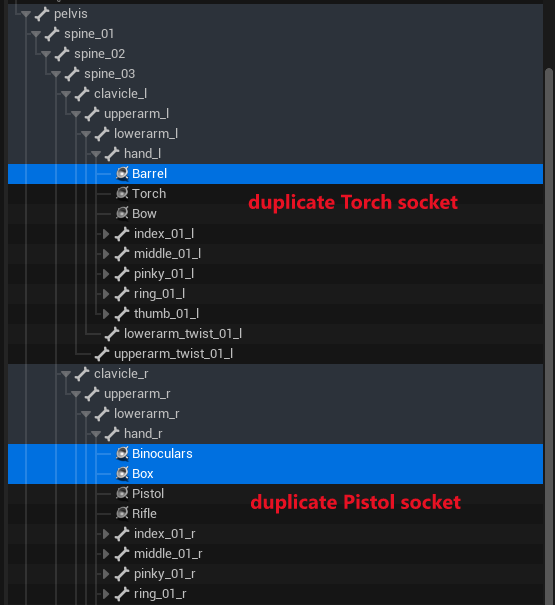
Then test each overlay in play mode and tune the socket transform.
Example socket values from the character skeleton:
| Socket | Location | Rotation |
|---|---|---|
Box | X=-7.890643, Y=29.628185, Z=3.236120 | Pitch=1.018799, Yaw=82.250194, Roll=-62.371014 |
Binoculars | X=-12.565069, Y=12.195616, Z=5.031601 | Pitch=22.577567, Yaw=127.458269, Roll=113.036738 |
Barrel | X=12.779593, Y=-23.594061, Z=16.111620 | Pitch=11.576060, Yaw=126.704295, Roll=164.348389 |
Static Overlay Left-Hand IK Limitation
Section titled “Static Overlay Left-Hand IK Limitation”The current left-hand IK graph reads the grip target from:
OverlaySkeletalMeshThat works for skeletal overlay objects that contain a LeftHandGrip socket, such as the custom rifle and custom pistol.
Torch, box, barrel, and binoculars use:
OverlayStaticMeshSo with the current Animation Blueprint graph, those static overlays do not automatically provide a LeftHandGrip target to the Control Rig.
This does not mean static mesh overlays can never support extra hand targets. It only means this guide stops at socket alignment for those overlays because the current setup only reads LeftHandGrip from the skeletal overlay component.
To solve static-overlay left-hand correction later, the Animation Blueprint would need an additional path for reading a target from OverlayStaticMesh or another explicit target source.
Result
Section titled “Result”After this setup:
- pistol attaches to the visible character through the
Pistolsocket - pistol two-handed mode can use the duplicated pistol’s
LeftHandGripsocket - pistol one-handed mode disables left-hand IK by checking
OverlayMode - bow attaches through the
Bowsocket onhand_l - torch attaches through the static mesh path and the
Torchsocket - box, barrel, and binoculars use their own character sockets
- static overlays are documented as socket-alignment-only for now, unless the Animation Blueprint is extended later